IMABuildeRz v3 rev23.09.19
TEST RESULTS
Please check the results below, If there are no errors, please go to the Activation Tab
ROOT: 0710
| Output Buffering | 4096 | |
| Write a file to root directory | WRITE: root/test.fileFilesystem: fwrite, file_get_contents, etc | OK |
| Write a file to class directory | WRITE: root/system/class/test.fileFilesystem: fwrite, file_get_contents, etc | OK |
| Write a file to outputs directory | WRITE: root/outputs/test.fileFilesystem: fwrite, file_get_contents, etc | OK |
| Make outputs directory | MD: root/outputs/test/folder/Filesystem: mkdir | OK |
| Write a file to outputs directory | WRITE: root/outputs/test/folder/test.fileFilesystem: fwrite, file_get_contents, etc | OK |
| Make projects directory | MD: root/projects/test/folder/Filesystem: mkdir | OK |
| Write a file to projects directory | WRITE: root/projects/test/folder/test.fileFilesystem: fwrite, file_get_contents, etc | OK |
| Create a image file | GD: root/outputs/test/folder/test.jpgGD: imagecreatefrompng, imagepng, etc | OK |
| Create Zip file | ZIP: root/outputs/test/folder/test.zipZip: ZipArchive | OK |
| Unzip a file to Zip folder | UNZIP: root/outputs/test/zip/test.txtFilesystem: fwrite, file_get_contents, etc | OK |
ACTIVATION
NOTE
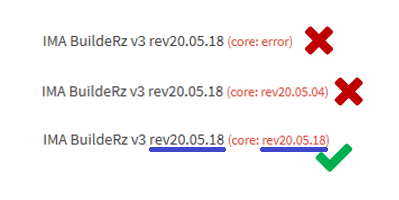
The correct Version
Changing Permission Files/Folder
Linux/OSX
Permissions are used 777 by including folder and subfolders (option -R / recursive). Run your terminal or ssh, type this command:
$ sudo su
$ cd /var/www/vhosts/marc-rosenkranz.de
$ chmod -R 777 *
Windows
Run Window Explorer, go to /var/www/vhosts/marc-rosenkranz.de/app.marc-rosenkranz.de. Normally, you would access the properties of a file or folder by right-clicking it. Then selecting Properties from the appearing context menu.in Tab General, unchecked read-only then click OK